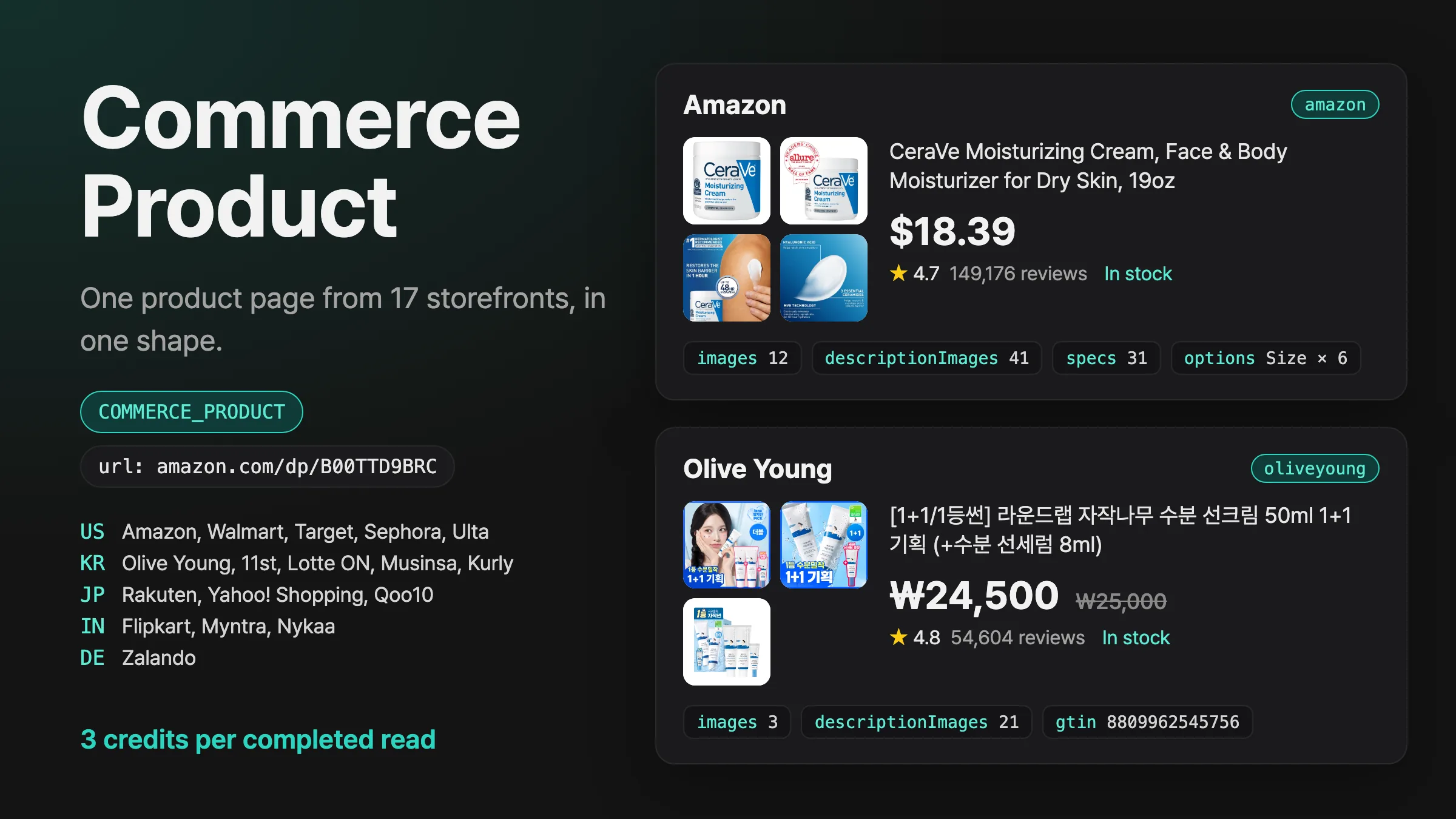
Commerce Product를 소개해요
Amazon, Walmart, Sephora, 올리브영, Rakuten, Zalando 등 쇼핑몰 17곳의 상품 페이지 URL을 넣으면 가격, 재고, 대표 이미지와 상세 이미지, 상품 정보, 옵션을 같은 형식으로 받아요.
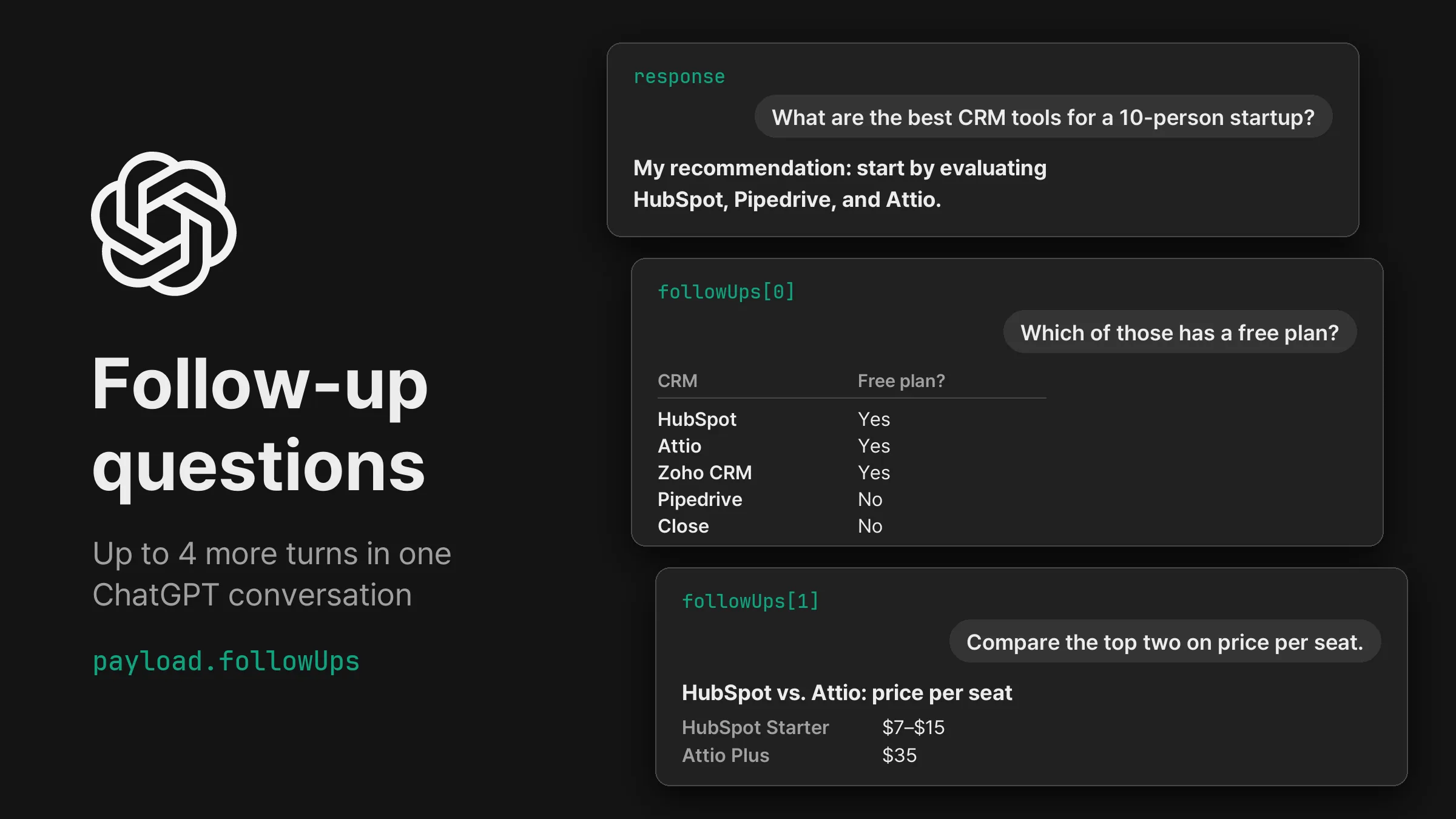
ChatGPT 태스크에 이어 물을 질문을 최대 4개 넣고, 같은 대화에서 나온 답변을 출처, 검색어와 함께 하나씩 받아요.
payload.followUps: 첫 답변 뒤 같은 ChatGPT 대화에서 이어 물을 질문, 최대 4개.followUps: 이어 간 차례마다 답변이 순서대로 담깁니다. 항목마다 보낸 prompt와 그 답변의 text, markdown, sources, searchQueries, model이 있습니다.select: 답변에 ChatGPT가 띄운 예산, 용도 같은 선택 양식의 버튼을 누르고, 조건에 맞춰 좁힌 답변을 받습니다. selection에 누른 버튼과 고른 값이 남습니다.이어 묻는 질문은 첫 답변이 시작한 대화 안에서 보내므로, ChatGPT는 앞선 대화를 보고 답합니다. 아래 예시에서 ChatGPT는 먼저 10명 규모 스타트업에 HubSpot, Pipedrive, Attio를 추천했습니다. 이어서 “Which of those has a free plan?”이라고 묻자 HubSpot, Attio, Zoho CRM, Pipedrive, Close의 무료 플랜 표로 답했고, 세 번째 차례에서는 HubSpot과 Attio를 좌석당 가격으로 비교했습니다.
답변 끝에 선택 양식이 있으면 ChatGPT는 사용자에게 선택지를 고르고 버튼을 누르게 합니다. 한국에서 “가성비 무선 이어폰 3개 추천해줘”라고 묻자 스마트폰, 예산, 사용 목적을 고르는 양식이 함께 나왔습니다. { "select": {} }는 ChatGPT가 미리 골라 둔 값(갤럭시, 5만 원 이하, 출퇴근과 음악 감상)으로 “조건에 맞춰 다시 추천받기” 버튼을 눌렀고, 그 조건에 맞춘 새 추천을 받았습니다.
button은 앞 답변의 버튼을 0부터 세며 기본값은 0입니다. choices는 양식 순서대로 쓴 배열이나, layout에 있는 선택 항목의 name을 키로 쓴 객체로 넣습니다. 값은 선택지의 값, 라벨, 0부터 센 위치 중 하나입니다. 앞 답변에 그 양식, 버튼, 선택지가 없으면 남은 질문은 멈추고 followUpsStopped에 이유가 담기며, 태스크는 받은 답변으로 완료됩니다.
모든 차례에 첫 답변과 같은 검사(빈 답변, 요청한 위치, 모델)를 합니다. 검사를 통과하지 못한 차례는 ChatGPT의 다시 생성처럼 대화의 같은 자리에서 다시 묻습니다. 한국에서 다섯 차례 이어진 대화는 240~285초에 끝났습니다.
API 키를 Authorization 헤더에 넣어 요청을 보냅니다.
curl -X POST https://api.querying.ai/v1/async/task \
  -H "Authorization: Bearer $QUERYING_API_KEY" \
  -H "Content-Type: application/json" \
  -d '{
    "taskType": "CHATGPT",
    "payload": {
      "prompt": "What are the best CRM tools for a 10-person startup?",
      "country": "US",
      "followUps": [
        { "prompt": "Which of those has a free plan?" },
        { "prompt": "Compare the top two on price per seat." }
      ]
    }
}'taskTypestring필수CHATGPT, GOOGLE 같은 값을 넣습니다.payload.promptstring필수payload.countrystringUS, KR, JP 등. 기본값 US.payload.followUpsarray{"prompt": "…"}이거나, 앞 답변에 있는 양식의 버튼을 누르는 {"select": {…}}입니다. CHATGPT에서 씁니다.webhook.urlstring완료된 태스크는 이런 형태입니다. 길이를 줄여 보여 드립니다.
{
  "success": true,
  "task": {
    "id": "0c61ad33-1514-47b2-b7f2-d79d4a6cd956",
    "taskType": "CHATGPT",
    "status": "COMPLETED",
    "createdAt": "2026-10-16T00:02:14.833Z"
  },
  "credits": { "creditsToCharge": 3, "creditsCharged": 3 },
  "response": {
    "text": "For a 10-person startup, the best CRM is usually one that your team can adopt quickly, keeps sales activity organized, and doesn't require a full-time administrator to maintain.\n\n**My recommendation: start by evaluating HubSpot, Pipedrive, and Attio.** …",
    "sources": [
      {
        "position": 1,
        "url": "https://stackbytrade.com/startups/best-crm/",
        "label": "Best CRM for Startups (2026): 4 Options Compared on Price and Scale | StackByTrade",
        "attribution": "stackbytrade.com"
      }
    ],
    "searchQueries": [
      "best CRM software for startups 2026 HubSpot Pipedrive Attio Zoho Salesforce pricing features"
    ],
    "model": "gpt-6",
    "followUps": [
      {
        "prompt": "Which of those has a free plan?",
        "text": "## Free-plan comparison\n\n| CRM | Free plan? | Important limitation |\n|---|---|---|\n| **HubSpot** | Yes | Up to 2 users and 1,000 contacts on its free CRM offering. … |\n| **Attio** | Yes | Up to 3 seats. … |\n…",
        "sources": [
          {
            "position": 1,
            "url": "https://www.pipedrive.com/en/pricing/professional-crm",
            "label": "CRM Pricing Plans | Affordable CRM Software Costs | Pipedrive",
            "attribution": "pipedrive.com"
          }
        ],
        "searchQueries": [
          "HubSpot CRM free plan 2026 official pricing",
          "Attio free plan pricing 2026 official"
        ],
        "model": "gpt-6"
      },
      {
        "prompt": "Compare the top two on price per seat.",
        "text": "For your 10-person startup, the top two from my earlier recommendation were **HubSpot and Pipedrive**. …",
        "sources": [
          {
            "position": 1,
            "url": "https://www.hubspot.com/products/crm",
            "label": "Streamline Your Entire Business With a Free CRM | HubSpot",
            "attribution": "www.hubspot.com"
          }
        ],
        "searchQueries": [
          "HubSpot CRM pricing per seat 2026 official pricing free seats Starter annual billing",
          "Attio CRM pricing per seat 2026 official pricing free seats Plus annual billing"
        ],
        "model": "gpt-6"
      }
    ]
  }
}task.statusstringQUEUED, PROCESSING을 거쳐 답변과 함께 COMPLETED로, 또는 error와 함께 FAILED로 끝납니다.credits.creditsChargedintegerresponse.textstringresponse.sourcesarrayposition, url, label이 담깁니다.response.followUpsarrayprompt, select였다면 누른 버튼과 고른 값인 selection, 그리고 text, markdown, sources, searchQueries, model 같은 첫 답변의 필드가 있습니다.response.followUpsStoppedobjectselect가 누를 양식, 버튼, 선택지를 찾지 못하면 담깁니다. 그 차례의 index, NO_FOLLOW_UP_FORM 같은 code, message가 있습니다. 태스크는 그때까지 받은 답변으로 완료됩니다.요청하면 status가 QUEUED인 태스크가 바로 돌아옵니다. status가 COMPLETED나 FAILED가 될 때까지 GET /v1/async/task/{id}로 조회하거나, webhook.url을 넣어 같은 task, credits, response를 서버로 받으세요. 결과는 태스크가 끝난 뒤 24시간 동안 조회됩니다.
curl https://api.querying.ai/v1/async/task/$TASK_ID \
-H "Authorization: Bearer $QUERYING_API_KEY"답변 하나에 1크레딧으로, ChatGPT 태스크와 같습니다. 아래 예시는 답변 3개를 받아 3크레딧이 차감됐습니다. 이어 묻기가 중간에 멈추면 받은 답변만큼 차감됩니다.
Amazon, Walmart, Sephora, 올리브영, Rakuten, Zalando 등 쇼핑몰 17곳의 상품 페이지 URL을 넣으면 가격, 재고, 대표 이미지와 상세 이미지, 상품 정보, 옵션을 같은 형식으로 받아요.
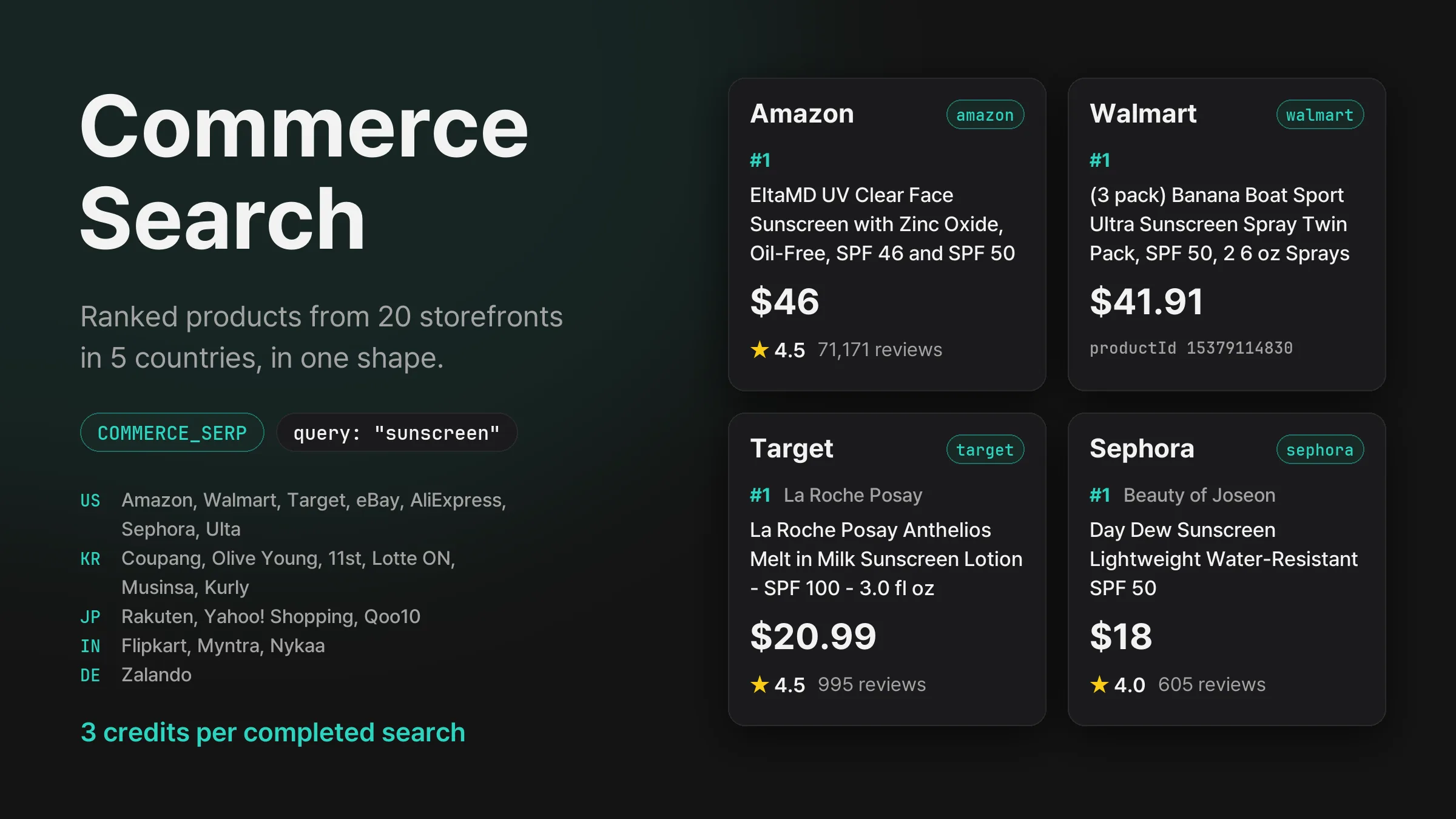
Amazon, Walmart, 쿠팡, 올리브영, Rakuten, Flipkart, Zalando 등 5개국 쇼핑몰 20곳에서 검색어의 상품 순위를 가격, 평점, 리뷰 수와 함께 같은 형식으로 받아요.
제품 업데이트를 이메일로 보내드립니다.