Attach up to 4 photos to a ChatGPT question from the API or the Playground, and get the answer ChatGPT writes about them with its sources and searches.
What you get
payload.images: up to 4 photos sent with the first question of a ChatGPT task, as public image URLs or data URLs.
The answer in the same fields as any ChatGPT answer: text, markdown, sources, searchQueries, and the products and places ChatGPT showed.
In the Playground, the photo button in the message box attaches photos to a ChatGPT question, and a photo pasted or dropped into the box joins it too. The photos show above your message in the conversation.
followUps in the same request keep asking about the photos in the same conversation.
How it works
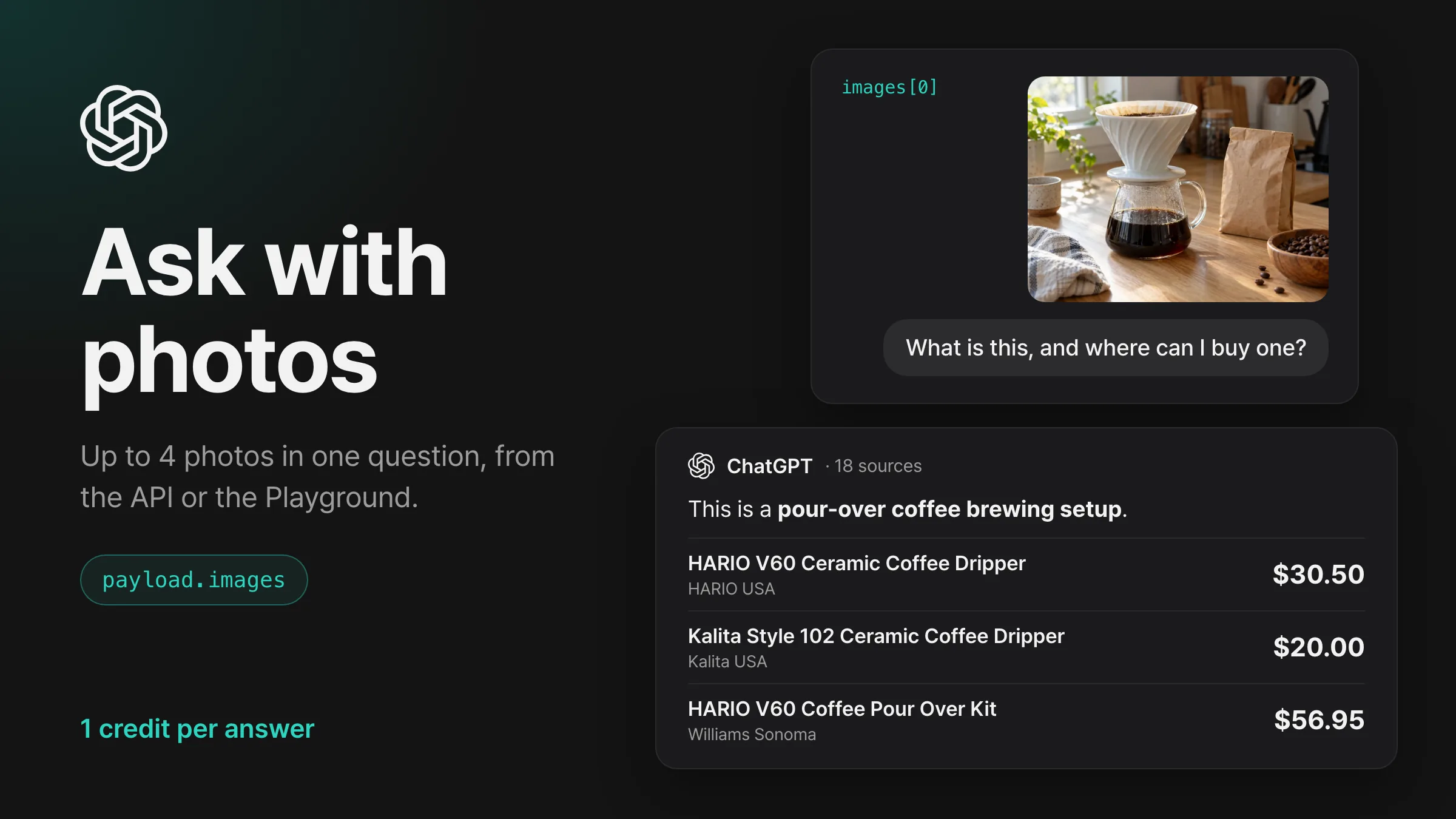
Photos go with the first question of a new ChatGPT conversation, the way a user adds them with the photo button on chatgpt.com. ChatGPT looks at the photos, searches the web when the question needs it, and answers with its sources. In the example below, ChatGPT recognized a pour-over coffee setup in the photo, searched “where to buy ceramic pour over coffee dripper white Hario V60”, and recommended the HARIO V60 Ceramic Coffee Dripper from HARIO USA ($30.50), the Kalita Style 102 Ceramic Coffee Dripper from Kalita USA ($20.00) and the HARIO V60 Coffee Pour Over Kit from Williams Sonoma ($56.95).
Each photo is read once before ChatGPT is asked: a data URL is decoded, and a URL is downloaded from its public host, up to 10 MB a photo, in JPEG, PNG, WebP or GIF. A photo that fails to download or open ends the task with BAD_PAYLOAD, and a failed task is free.
A data URL travels inside the request, which holds up to 1 MiB, so larger photos go as URLs. The Playground sends photos as data URLs and shrinks large ones, so 4 photos fit in one message.
A question with photos is asked from the country in payload.country and continues with followUps. With payload.location, a country of HK or CN, or continueFrom, the request returns 400 VALIDATION_ERROR, and with include.html on, it returns 422 EVIDENCE_UNSUPPORTED.
Where it helps
Show ChatGPT a photo of your product, ask where to buy it, and see which stores and prices it recommends and whether your store is among them.
Ask about a photo of your packaging or a competitor’s, and read which brand ChatGPT names and which pages it cites.
Ask about a menu, a label or a screenshot of your page, and compare what ChatGPT reads in it with what you published.
Get started
Open Playground, stay on Answer engines and keep ChatGPT as the engine in the message box.
Select the photo button (Attach photos) and choose up to 4 photos, or paste or drop them into the message box.
Type your question and select Send. The photos show above your message, and the answer arrives with its sources.
Switch the answer to cURL and select Copy cURL to run the same request, photos included, from your terminal.
Send a request
Send the request with your API key in the Authorization header.
curl -X POST https://api.querying.ai/v1/async/task \
  -H "Authorization: Bearer $QUERYING_API_KEY" \
  -H "Content-Type: application/json" \
  -d '{
    "taskType": "CHATGPT",
    "payload": {
      "prompt": "What is this, and where can I buy one?",
      "country": "US",
      "images": ["https://querying.ai/changelog/chatgpt-photos-example.jpg"]
    }
  }'
Request fields
taskTypestringRequired
The engine to run, such as CHATGPT or GOOGLE.
payload.promptstringRequired
The question, written the way a user types it into the chat. Up to 100,000 characters.
payload.imagesarray
1 to 4 photos asked with the first question, as public http(s) URLs or data:image/…;base64, data URLs. JPEG, PNG, WebP or GIF, up to 10 MB each. followUps keep asking about them. For CHATGPT.
payload.countrystring
Two-letter country code of the market to ask from, such as US, KR or JP. Default US.
payload.followUpsarray
Up to 4 more turns in the same ChatGPT conversation after the first answer. Each item is {"prompt": "…"} to ask a question, or {"select": {…}} to press a button on the form in the previous answer. For CHATGPT.
webhook.urlstring
An HTTPS address on your server. The finished task is posted there the moment it completes.
Response
A finished task looks like this, trimmed for length.
JSON
{
  "success": true,
  "task": {
    "id": "d4f322bc-4d27-4800-a6b4-f0cb9f66f4b0",
    "taskType": "CHATGPT",
    "status": "COMPLETED",
    "createdAt": "2026-10-28T04:56:48.117Z"
  },
  "credits": { "creditsToCharge": 1, "creditsCharged": 1 },
  "response": {
    "text": "This is a **pour-over coffee brewing setup**. The white ceramic cone is a coffee dripper, and the glass pot underneath is a carafe. …\n\n## Where to buy a similar setup\n\n…\n\n**1. HARIO V60 Ceramic Coffee Dripper**\n\n## $30.50\n\nHARIO USA\n\nA classic white ceramic cone with spiral ridges, very similar to the one pictured. …",
    "sources": [
      {
        "position": 1,
        "url": "https://www.hario-usa.com/products/v60-coffee-pour-over-02-ceramic-kit",
        "label": "V60 Ceramic Pour Over Coffee Set – Hario USA",
        "attribution": "hario-usa.com"
      }
    ],
    "searchQueries": [
      "where to buy ceramic pour over coffee dripper white Hario V60"
    ],
    "model": "gpt-6"
  }
}
task.statusstring
QUEUED, PROCESSING, then COMPLETED with the answer or FAILED with error.
credits.creditsChargedinteger
Credits charged for the finished task. A failed task charges 0.
response.textstring
The answer as plain text.
response.sourcesarray
The pages the answer cites, in the engine’s order, each with position, url and label.
response.searchQueriesarray
The web searches the engine ran to write the answer.
Receive the result
The request returns the task right away with statusQUEUED. Poll GET /v1/async/task/{id} until status is COMPLETED or FAILED, or add webhook.url and the finished task arrives at your server with the same task, credits and response. Results stay available for 24 hours after a task finishes.
payload.images is sent to an engine other than CHATGPT, is empty, holds more than 4 photos or a value other than an http(s) URL or an image data URL, or comes with payload.location, a country of HK or CN, or continueFrom. details names the field.
EVIDENCE_UNSUPPORTEDHTTP 422
include.html is on for a question with payload.images.
PAYLOAD_TOO_LARGEHTTP 413
The body is over 1 MiB, or over 8 MiB for a batch.
MISSING_API_KEYHTTP 401
The Authorization header is missing, or its key is unknown, expired or revoked.
INSUFFICIENT_CREDITSHTTP 402
The balance is below the price of the task. Add credits or upgrade the plan, then send again.
Pricing
Each answer costs 1 credit, the price of a ChatGPT task, with or without photos. Each follow-up answer adds 1 credit. A task that ends with BAD_PAYLOAD is free.
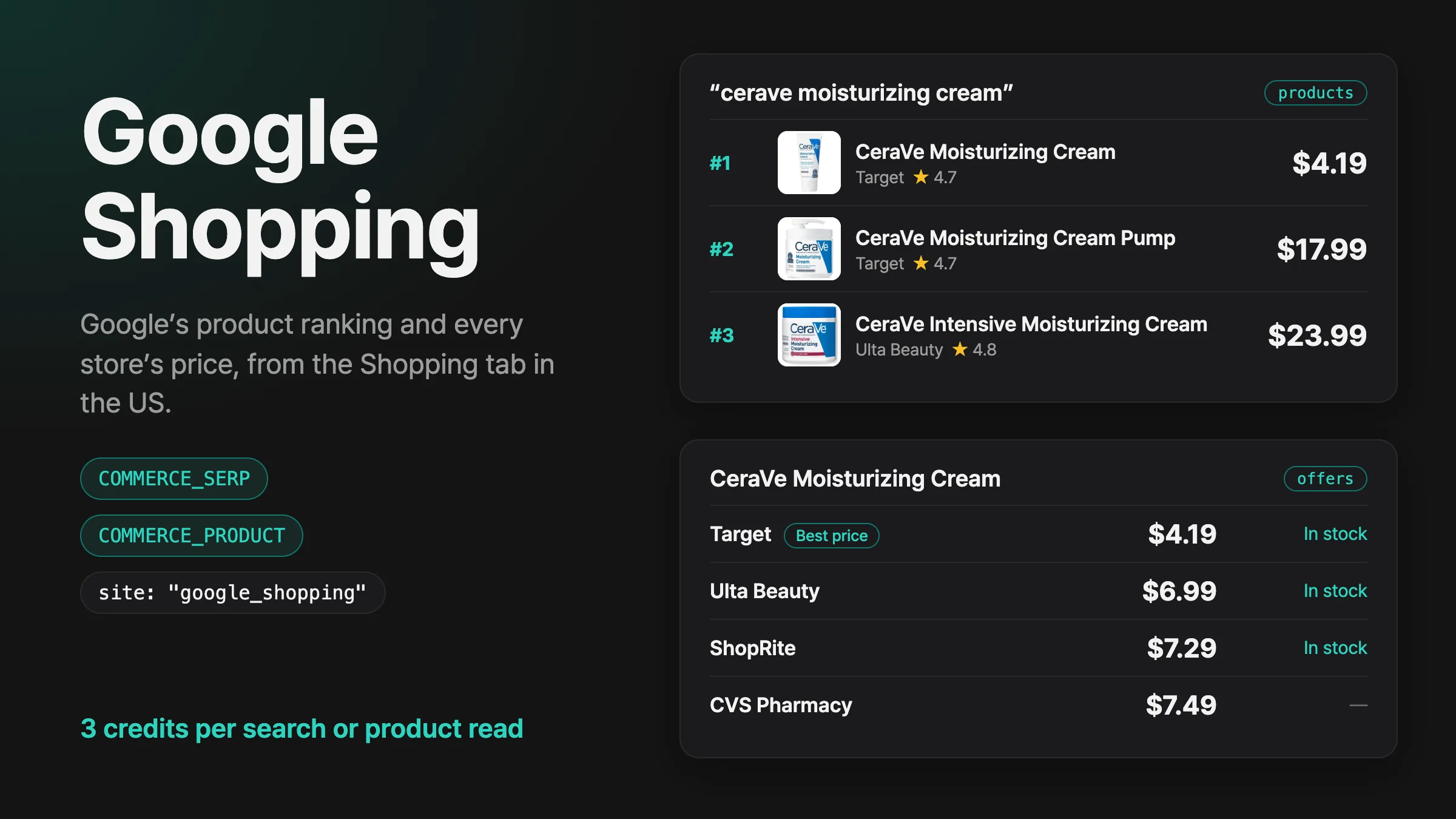
Search Google’s Shopping tab in the US with Commerce Search, then read any product with Commerce Product to get every store Google lists for it, with its price, stock and product page.
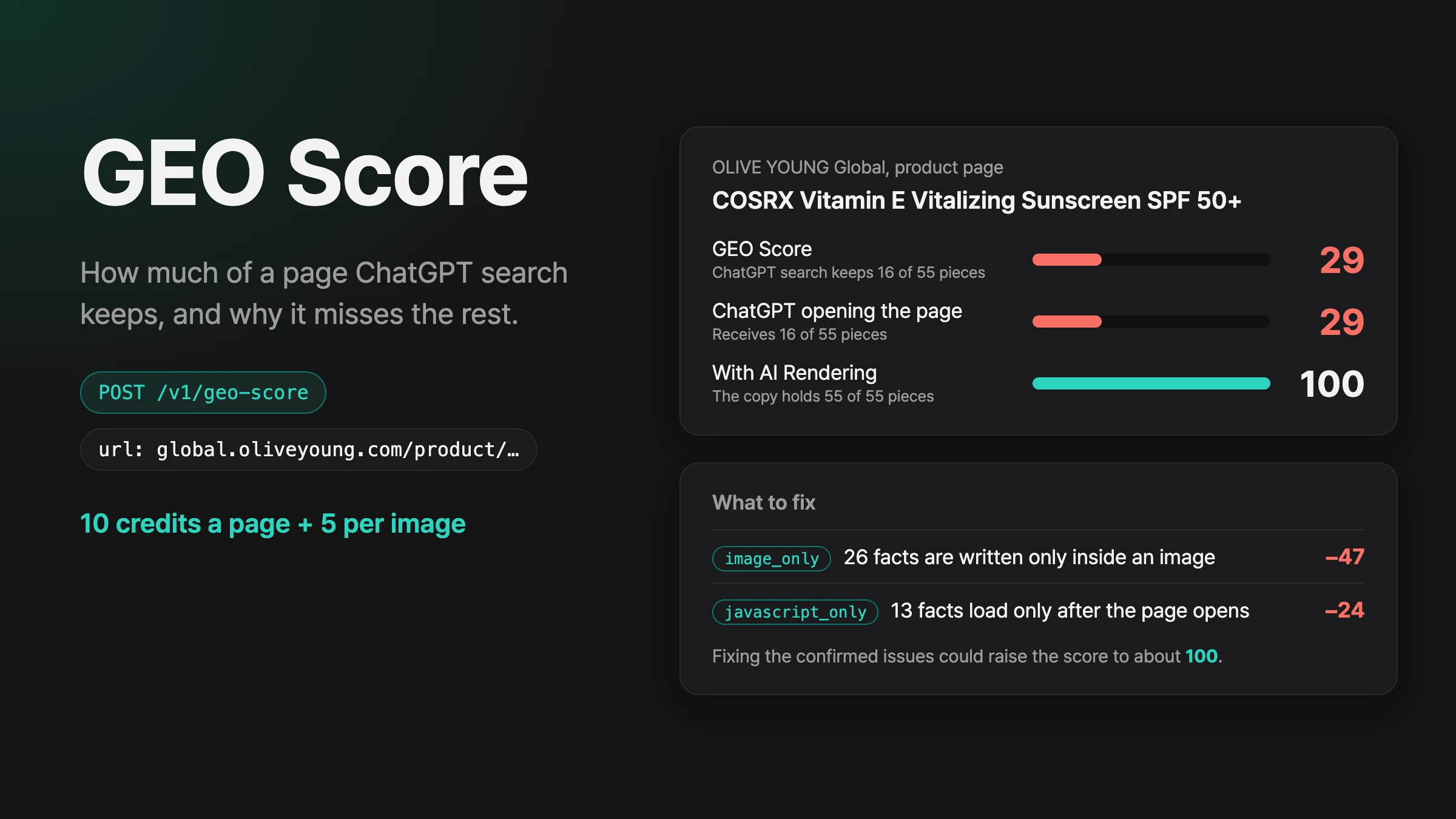
Send a page URL to GEO Score and get the share of the page ChatGPT search keeps, what ChatGPT receives when it opens the page, and the reason and fix for every piece it misses.